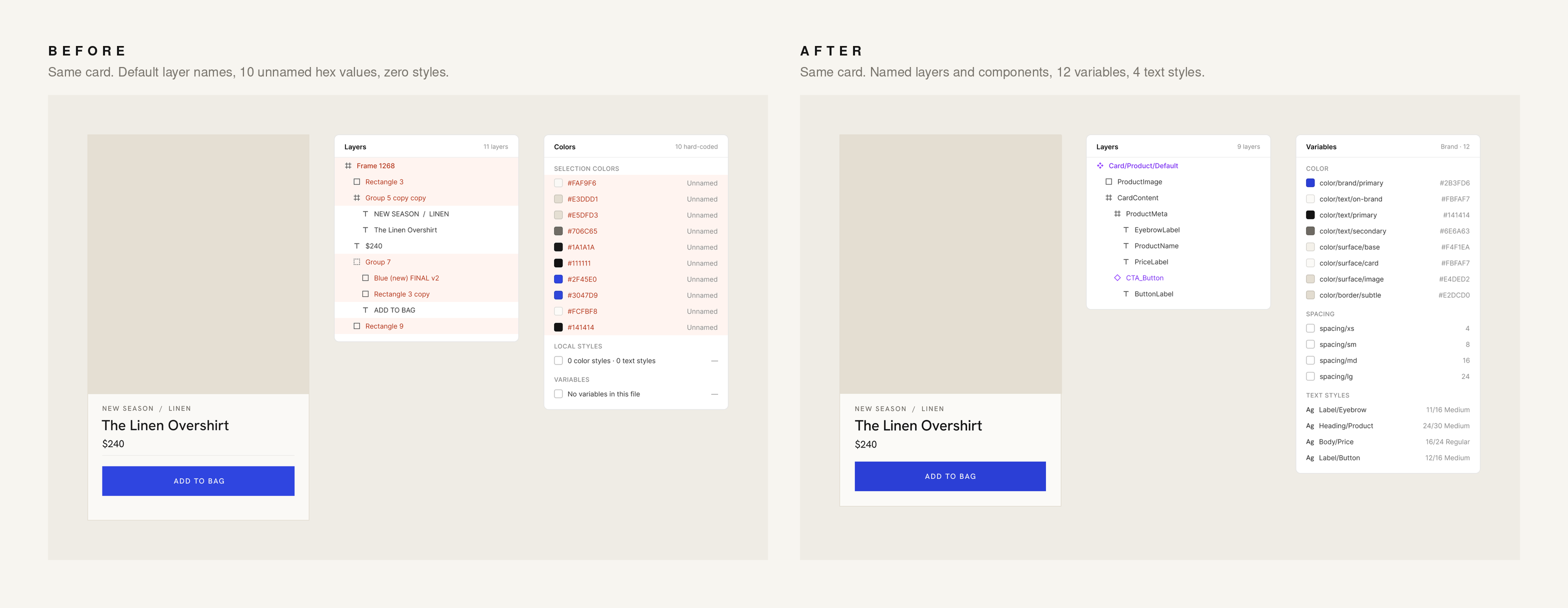
Their help article on prepping your design system for the Figma agent is even blunter. A component called Card/Product/Default is "immediately interpretable; a component called Frame 42 copy is not." Default layer names like Group 7 or Rectangle 3 "give the agent nothing to work with." And my favorite: "A variable called blue-500 tells agents nothing about when to apply it; color/brand/primary does."
That's not an AI feature. That's a style sheet. With a class naming system. Exactly what good brand designers have been nagging everyone about since before "the cloud" was a thing.
The receipts
When Coinbase's design system team tested coding agents with and without Code Connect, their technical lead said agents "had been notorious for hallucinating illustration and icon names. After completing our adoption of Code Connect, that problem disappeared overnight." Same design, same prompt, same model: token use down 11.5%, time to implementation down 22.3%, cost down 22.5%. His warning for anyone skipping it: "The agent can go wild in how it interprets the design."
Go wild. On your brand. At scale.
Meanwhile, Figma's AI report found 68% of developers use AI to write code, but only 32% of designers and developers trust the output. Figma's diagnosis: "context is everything."
And the people who actually maintain design systems? In zeroheight's Design Systems Report 2026, only 7% say their system is fully adopted across all teams, and only 54% have tokens set up across design tools, code and documentation. One respondent summed up the AI tooling gap better than any keynote: "none of these AIs support a design system out of the box without hallucinating."
So the system exists, half-finished, half-used, and we're pointing robots at it and acting surprised.
It's not just Figma
The same rule applies to everything you feed an agent. Sitemaps. Brand guidelines. Content models. Instructions. Folder structures. File names.
Anthropic points out that "folder hierarchies, naming conventions, and timestamps all provide important signals that help both humans and agents understand how and when to utilize information." A sitemap with three "About" pages and a folder called final_FINAL_use-this-one isn't a quirky creative mess. It's three About pages and a set of instructions the bot will follow straight off a cliff.
Organization isn't admin. It's the brief.
Old-school brand discipline is the new AI skill
This is the bit that should make every designer feel quite smug.
The skill that makes AI agents brilliant isn't prompting. It's the boring, traditional, slightly nerdy craft of brand organization: a proper style sheet, every style applied to the designs, a naming system that actually means something, a palette with no orphans, components instead of detached copies.
Figma has even built Check designs to hunt down hard-coded colors, text styles, spacing and detached components, and it doesn't use AI at all. Its docs say it "works best with a published, variables-based design system." Of course it does. A linter can't check you against a system you never built, and neither can an agent.
"Name it, or the bot will."
Do the organizing first and something great happens. Agents stop inventing and start iterating. They pull your real tokens, reuse your real components, and spin out variations that actually look like your brand, at a speed that frankly is a bit annoying. The design gets better because the foundation was good to begin with.
AI doesn't replace a strong design. It amplifies whatever you give it, the brilliant and the janky alike.
So designers, the robots aren't coming for your job. They're coming for your Figma file.
Make it worth copying.